1) Open Free PDF to Word Doc Converter. Download Now
2) Click the left-top
 button to open the source
PDF file. The input PDF file and the output Doc file's paths will be
shown in the edit boxes.
button to open the source
PDF file. The input PDF file and the output Doc file's paths will be
shown in the edit boxes.3) Select the options you want to use, in the "General Options" group.
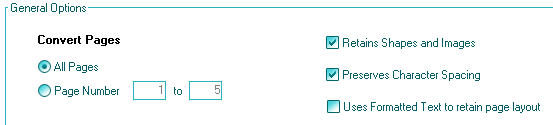
4) If you want to open the output doc file automatically after conversion, check the "Open Document for editing" checkbox. Select the doc reader which can be Windows WordPad or the default Windows program such as MS Word, OpenOffice DocWritter.

5) Click the "Convert to Word Document" button to start converting PDF to Word now!

