
Sunday, March 4, 2012


How to use Proxies in Windows?
Go to control panel
1)phone modem options
2)advanced
3)In Providers, click Microsoft H.323 Telephony Service Provider, and then click Configure.
4)In Configure H.323 Service Provider
5)To specify an H.323 proxy, select the Use H.323 proxy, and then type the server name or IP address for the proxy.
Try google for available proxy IP /servers...
Or
try www.proxy4free.com
this is a easy way of using private proxy with windows... plus its more secure than public CGI ones :D
1)phone modem options
2)advanced
3)In Providers, click Microsoft H.323 Telephony Service Provider, and then click Configure.
4)In Configure H.323 Service Provider
5)To specify an H.323 proxy, select the Use H.323 proxy, and then type the server name or IP address for the proxy.
Try google for available proxy IP /servers...
Or
try www.proxy4free.com
this is a easy way of using private proxy with windows... plus its more secure than public CGI ones :D
Remove duplicate files the easy way
I have always wanted this kind of software. I have thousands of mp3 songs packed in various partitions of my hard disk. I have collected these songs from several places and keep them storing, but the problem while augmenting my collection is that I am never sure whether I have copied the set of songs before or not, so I just copy them irrespective of the fact that they may be already present. The consequence is that my limited 40GB hard disk space is almost full leaving me with no more space to store anything else.
That is why I always wanted a software that could compare the contents of two folders and remove the duplicate elements.
 File Comparator is a program which compares any files by their contents. This utility allow you to quickly compare contents of any files in specified folders, and allow to show files which contain same data.
That is why I always wanted a software that could compare the contents of two folders and remove the duplicate elements.
 File Comparator is a program which compares any files by their contents. This utility allow you to quickly compare contents of any files in specified folders, and allow to show files which contain same data.
Thursday, February 23, 2012
Free Calls and SMS Globally with Viber
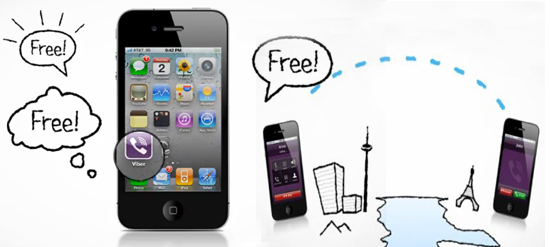
The thing which differentiates Viber from other apps like Nimbuzz, Skype, Gtalk or Yahoo is that it uses your Cell Number, rather than any User ID.
It works like this, you and your friend anywhere in the world install the viber app, verify your numbers and then open the app and use the keypad to dial the number (yes cellphone number) of your friend and your friend will receive a instant call just like they are receiving it from a GSM or CDMA network, no sign ups nothing.

This app also works great on your wifi iPad too, you only need to verify your cell number, once verified you can send free sms and call to anyone globally using your iPad.
You can download Viber app from Android Market Place and Apple App Store for free.
Design Websites without writing Code

Adobe Muse is a photoshop like design tool but rather than creating images it creates fully validated html/css code. Using Adobe Muse, you can focus on designed rather than coding and can easily add images, text, videos and much more with great visual control which you don’t' have in any other tools like Dreamweaver or Sitegridner.
Watch the video below to know how easy it is to design profesinal looking websites without any coding in Adobe Muse.
At present websites created in Muse are hosted on Adobe Business Catalyst but you can easily export the files to use it on any other platform by going to the File > Export HTML feature which creates the local copy of all the files for you and you can then use any FTP program to upload it to your web host.
Muse is the code name of the product and Adobe is offering it for free during public beta period. The final version of Adobe Muse will be released in early 2012 and then you need to purchases license if you want to continue authoring website using adobe muse.
Also Adobe Muse will be available through yearly or monthly subscriptions once the final version is ready because this will allow Adobe to add new features to Muse regularly and you will have access to the most up to date functionality.
Fonts used in Logos of Popular Websites

1. Google

Google logo uses the Catull font, Catull font has has a calligraphic feel with contrasting stroke weights and distinctive serifs. It is an eye-catching choice for both text and display applications.
2. facebook

FaceBook logo uses the customized version of Klavika font. Klavika is a flexible family of sans serifs used for editorial and identity design.
3. YouTube

YouTube logo uses Aleternate Gothic font, Alternate Gothic font is a straight diagonal font, it contains a set of three condensed sanserifs fonts.
4. YAHOO!

Yahoo logo uses its own custom designed font, Daniel Gauthier created the font similar to Yahoo's and made it available at DaFont.
5. WIKIPEDIA

Wikipedia logo uses Hoefler Text font, Hoeflter Text is a contemporary serif Antiqua font and was first designed for Apple Computer to demonstrate advanced type technologies.
6. Blogger

Blogger logo uses the FF Info Display font, FF Info Dispaly font was designed for the signage at Dusseldorf Airport.
7. Windows Live

Windows Live logo uses the simple Arial font, a contemporary sans serif font. Nothing Designer or unique out here.
8. twitter

Twitter logo uses the modified version of Pico Alphabet Font, Pico Alphabet can be downloaded and used without any license.
9. LinkedIn

LinkedIn logo uses Myriad Pro font, Myriad is a popular font for both text and display composition.
10. Amazon

Amazon logo uses the ITC Officiana Sans font, ITC Officiana font was designed for office correspondence and business documentation.
11. WordPress

WordPress logo uses Mrs Eaves font, Mrs Eaves is a transitional serif font named after Sarah Eaves.
12. eBay

eBay logo uses Adobe Univers font, Univers font is similar to contemporary and Helvetica fonts.
13. Bing

Bing logo uses combination of ITC Bauhaus and ITC Kabel fonts.
Monday, February 6, 2012
TechCruse Join Google Apps!!!!1
 |
|


Powerful communication and collaboration tools for your organizationThe right tools can make projects faster and easier. Whether you're working with colleagues, doing a school project, or coordinating with your group, Google Apps saves you time and trouble.
|
Subscribe to:
Posts (Atom)